
AI video production platform for team workflows
MergeMate.ai is an AI video production platform for teams that need more than a prompt box. It connects briefs, real footage, AI-generated assets, model orchestration, project memory, review, and delivery in one workflow.
AI video production platform vs AI video generator
| Capability | AI video generator | AI video production platform |
|---|---|---|
| Brief and strategy | Usually starts from a prompt | Keeps briefs, scripts, references, and production intent connected |
| Real footage and assets | Often separate from generation | Works with uploaded footage, brand assets, references, and generated media |
| Model orchestration | One model or isolated tool choice | Routes tasks across 35+ active AI models and capabilities |
| Editing and sequencing | Output is usually a clip | Connects generated outputs to editing-oriented project workflows |
| Review and approvals | Handled in another tool | Client review and team feedback stay close to the project |
| Project memory | Limited or session-based | Prompts, assets, comments, choices, and versions remain connected |
| Delivery/export | A separate production step | Export and version requirements can be planned from the same workspace |
What teams need beyond text-to-video
Real productions include briefs, scripts, source footage, references, brand assets, version history, review, subtitles, voiceover, exports, and approvals. MergeMate.ai is built around those moving pieces instead of treating generation as the whole job.
A practical AI video production workflow
- 1.Brief
- 2.Asset intake
- 3.Model routing
- 4.Generation
- 5.Edit and review
- 6.Export and delivery
- 7.Reuse through project memory
The Scattered Toolchain Problem
5-7 Disconnected Tools
Editing software, file sharing, review tools, GenAI services, communication platforms, render farms, and export utilities — none of them talk to each other.
Context Lost Between Tools
Every time you switch tools, you lose context. The review tool doesn't know your timeline. The GenAI service doesn't know your project. The editor doesn't know the client feedback.
Compounding Costs
Each tool has its own subscription, its own learning curve, its own support channel. The operational overhead of maintaining a multi-tool stack grows with every project.
Five Pillars, One Platform
Everything a professional video team needs — editing, asset management, AI generation, Mergi automation, and collaboration — unified in a single workspace.
Video Timeline
Professional Editing in the Browser
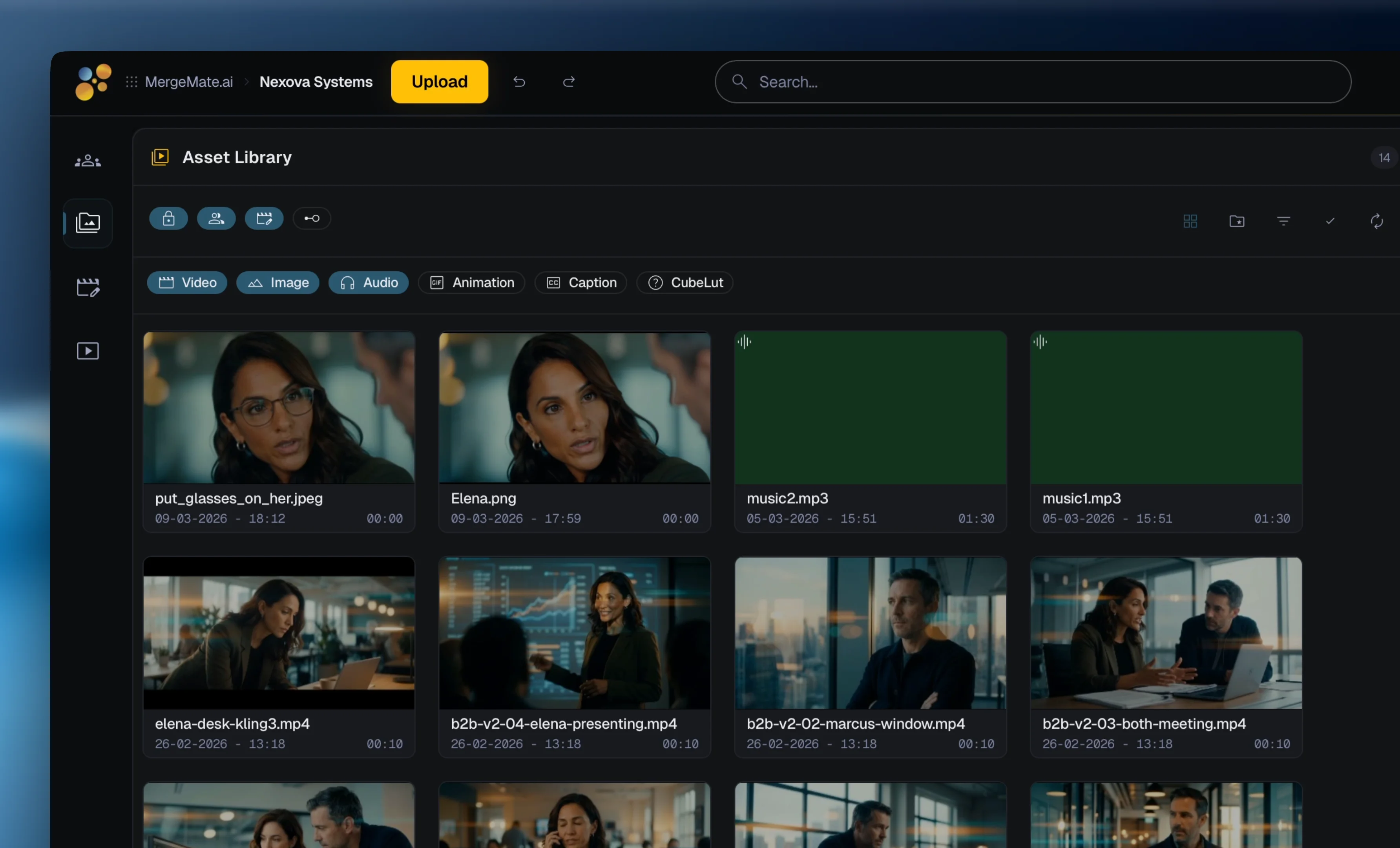
A browser-based production timeline for video teams. Clip organization, editing-oriented workflows, generated assets, comments, and multi-format preview can live closer to the same project context.
- Multi-track video and audio timeline
- Clip trimming, splitting, and transitions
- Keyframe animation for effects and motion
- Preview-oriented workflows with project context
Asset Management
Semantic Search & Auto-Tagging
Uploaded and generated assets can become searchable project material instead of disconnected files. Search by meaning — for example 'sunset over city skyline' — not only by filenames.
- AI-assisted content tagging and metadata
- Semantic search across project assets
- Similarity-oriented search workflows
- Organized folders with smart collections
GenAI Generation
35+ Active Models for Video, Image, Audio, Music, Text
Generate video clips, images, voiceover, sound effects, music, and text from 35+ active AI models and capabilities. One unified interface helps Mergi route tasks to suitable models and prompt workflows.
- Video: DreamActor M2.0, Grok Imagine Video, Kling Video 3.0, Runway Aleph, Runway gen-4.5, Seedance 2.0, VEO 3.1
- Image: FLUX.2, GPT Image 2, Grok Imagine Image, Imagen 4, Nano Banana, Seedream 5.0 lite
- Audio: ElevenLabs, Lyria 3, Lyria 3 Pro, MiniMax Music 2.6
- Text: Gemini, GPT, DeepSeek for analysis and scripting
Mergi — Your AI Partner
Agentic Automation of Production Tasks
Mergi coordinates specialists for script, visuals, cinematography, and production planning — you talk to one assistant. It uses project context and can help with multi-step tasks through conversation.
- Conversational editing via natural language
- Multi-step task planning and delegation
- Persistent memory across projects and sessions
- Film craft knowledge base
Team Collaboration
Multi-User, Role-Based, Real-Time
Keep team feedback, project roles, comments, and visual moodboards closer to the same production workspace. Visual moodboarding uses an integrated canvas for concept development.
- Team-oriented project collaboration
- Time-aware comments and review context
- Role-based access control
- Visual Moodboard
Before vs. After
Scattered Toolchain
- Editing: Adobe Premiere / DaVinci Resolve
- Storage: Google Drive / Dropbox
- Review: Frame.io / Wipster
- GenAI: Seedance 2.0 + Runway + FLUX.2 + ElevenLabs
- Communication: Slack + Email + WhatsApp
- Rendering: Local GPU or cloud render farm
- Export: Manual per-platform adjustment
MergeMate.ai
- Timeline editing in the browser
- Asset management with semantic search
- Frame-accurate review and comments
- 35+ active AI models, one unified interface
- Team collaboration and shared context
- Cloud-native production and credit-based AI usage
- Multi-format version planning from one project
Cloud-Native Advantages
No Local GPU Required
AI generation and production-heavy tasks are designed to run through the cloud platform, reducing dependence on a single local editing machine.
Credit-Based Pricing
GenAI generation and platform usage can be modeled through credits, so teams can scale usage around project needs.
Access from Anywhere
Your projects, assets, and timeline live in the cloud. Open your browser and continue where you left off — from any location, any device, any operating system.
MergeMate is in Early Access. Get in now — shape what it becomes, pay less than everyone who waits.
Join Early AccessAI video production platform FAQ
What is an AI video production platform?
An AI video production platform connects briefs, footage, generated assets, model routing, editing, review, and delivery so teams can manage AI video work as a repeatable production workflow.
How is an AI video production platform different from an AI video generator?
An AI video generator creates isolated outputs from prompts. A production platform manages the surrounding workflow: source assets, model choice, review, approvals, project memory, and delivery.
Who needs an AI video production platform?
Agencies, marketing teams, production companies, and creative teams need a platform when AI-generated clips must work with real footage, stakeholders, revisions, and delivery requirements.
Can teams use real footage and generated video together?
Yes. MergeMate.ai is positioned around real production assets and AI-generated media in the same project context.
Why does project memory matter in AI video production?
Project memory keeps briefs, prompts, assets, comments, decisions, and versions connected so teams do not lose context between tools and revisions.
Explore More
MergeMate.ai is built by founders combining 25+ years of professional film production with software architecture for AI orchestration, collaboration, and cloud workflows.
By Thomas Fenkart — 25+ years in professional video production · Last updated: March 2026
Get in early.
Shape what it becomes.
MergeMate is in Early Access. We're not looking for beta testers — we're looking for co-builders. Get in now, shape what it becomes, and pay a lot less than everyone who waits.